
Florida Office Phone Outage Checklist
Hurricane season in Florida is not a hypothetical. Power goes out, internet circuits go down, and if your office phone system is not ready, your customers hear silence or a busy signal at exactly the wrong moment. This checklist walks Florida business owners and office managers through every test that should happen before a storm threatens your area — so your phones keep working even when your building does not.
Before hurricane season, every Florida office should test call failover routing, confirm mobile and desktop softphone access, verify voicemail-to-email delivery, and review auto-attendant messages for after-hours and emergency scenarios. A hosted VoIP system with cloud-based call routing gives your team the best chance of staying reachable when local infrastructure is disrupted. If your current phone system has no documented failover plan, that is the first thing to fix.
- A hosted VoIP system routes calls through the cloud, so your numbers stay active even if your office loses power or internet.
- Failover routing, mobile softphones, and voicemail-to-email must be tested before a storm — not during one.
- Auto-attendant messages and after-hours call flows should have a documented storm-mode version ready to activate.
- Number porting records and carrier account credentials should be documented and accessible off-site.
- Local support from a Florida-based provider means faster response when something goes wrong during or after a storm.
Who This Checklist Is For
This guide is for you if:
- You operate a Florida business with a physical office in Orlando, Tampa, Miami, Jacksonville, Winter Garden, or anywhere else in the state.
- Your business depends on inbound calls — from customers, patients, clients, or vendors — and a missed call has a real cost.
- You are running a hosted VoIP system and want to confirm your failover configuration is actually working.
- You are still on a legacy PBX or landline system and have no documented plan for what happens when the power goes out.
- You manage multiple office locations and need consistent call handling across all of them during a disruption.
This guide is NOT for you if:
- You are a solo home-based worker with a personal cell phone as your only business line and no staff to coordinate.
- Your business is fully closed during hurricane season and has no customer-facing phone obligations.
- You are looking for a consumer VoIP app review rather than a business phone system evaluation.

Phone System Options: Outage Readiness at a Glance
Not all phone systems handle outages the same way. Before running through the checklist, it helps to understand where your current setup stands.
| System Type | Survives Power Outage? | Survives Internet Outage? | Mobile Failover? | Remote Call Management? | Local Florida Support? |
|---|---|---|---|---|---|
| Hosted VoIP (Mynians VoIP) | Yes, with mobile softphone or call forwarding | Partial — calls route to mobile or alternate number | Yes | Yes, cloud-based admin portal | Yes — Orlando-area team |
| RingCentral / Nextiva (national hosted VoIP) | Yes, with mobile app | Partial — depends on configuration | Yes | Yes | No — remote support only |
| AT&T Business (hosted or SIP) | Varies by plan | Varies by plan | Limited | Limited | No — national carrier support queue |
| Legacy On-Premise PBX | No — goes down with power | No — tied to local hardware | No built-in option | No | Depends on local vendor |
| DIY Softphone Apps (personal) | Yes, if phone is charged | No — requires data or Wi-Fi | N/A | No admin controls | No support |
The core advantage of a properly configured hosted VoIP system is that your phone numbers live in the cloud. Even if your office is dark, calls can be routed to mobile devices, alternate numbers, or a recorded message — without anyone touching hardware on-site.
Checklist Section 1: Failover and Backup Routing
This is the most important section. Failover routing determines what happens to inbound calls when your primary office connection is unavailable.
- Confirm a failover destination is configured. Every main business number should have a documented fallback — a mobile number, a ring group that includes cell phones, or a recorded message with callback instructions.
- Test the failover path right now. Simulate an outage by temporarily disabling your desk phones or disconnecting your office router, then call your main number from an outside line. Does it ring where it should?
- Document who receives forwarded calls. If calls forward to a staff member’s cell during a storm, that person needs to know it is happening and be prepared to answer professionally.
- Review ring group and call queue settings. If your office uses call queues, confirm what happens when no agents are available — does the caller get a message, a callback option, or dead air?
- Verify hunt group order. If your system tries multiple extensions before forwarding, confirm the sequence is current and that the final destination is reachable off-site.
The most common failover problem we find when reviewing a Florida office’s phone setup is not a missing feature — it is a feature that was configured once and never tested. A call forwarding rule that pointed to a former employee’s cell phone, a ring group that still lists a desk phone as the primary destination, or a voicemail box that has been full for weeks. Run a live test call to every main number before June 1. If something does not work the way you expect, you want to find out on a Tuesday in April, not during a named storm.
Checklist Section 2: Devices and Remote Access
When staff evacuate or work from home during a storm, their ability to make and receive business calls depends on having the right tools set up in advance.
- Install and test softphone apps on staff mobile devices. Every key employee should have your business VoIP softphone installed, logged in, and tested before storm season. Do not wait until the evacuation order.
- Confirm desktop softphone access for remote workers. If staff work from laptops at home, verify they can log into the softphone client and make outbound calls using the business number.
- Test audio quality on a mobile data connection. Wi-Fi may be unavailable after a storm. Have at least one staff member test a call over LTE or 5G to confirm acceptable call quality.
- Verify admin portal access credentials. The person responsible for managing your phone system should be able to log into the admin portal from any device, from any location. Confirm the login works and that credentials are stored securely off-site.
- Identify who has authority to change call routing. During a storm, you may need to redirect calls quickly. Make sure at least two people know how to update routing rules — not just one.

Checklist Section 3: Voicemail, Notifications, and Auto-Attendant
Your auto-attendant and voicemail system are the voice of your business when no one can answer. They need to be accurate, current, and tested.
- Record a storm-mode auto-attendant greeting. Prepare a recorded message that acknowledges the disruption, provides alternate contact information, and sets realistic expectations. Have it ready to activate before a storm makes landfall.
- Confirm voicemail-to-email is active and delivering. Send a test voicemail to each main extension and verify the audio file arrives in the correct inbox. Check spam folders if it does not appear.
- Review after-hours routing. Confirm that after-hours call flows route to a live destination or a clear recorded message — not to a ringing phone that no one will answer.
- Check voicemail box capacity. A full voicemail box silently rejects new messages. Clear old messages and confirm each box has room for incoming calls during an extended outage.
- Update holiday and emergency schedule settings. If your system uses a schedule to switch between business-hours and after-hours routing, verify the time zone setting is correct and that you know how to override it manually.
Not sure if your current phone system has a working failover plan? Our team reviews your call routing, failover paths, and device setup at no cost. Schedule a free VoIP consultation and we will tell you exactly what needs attention before storm season.
Checklist Section 4: Number Porting and Carrier Records
If you ever need to move your phone numbers to a different carrier during or after a disaster, having your account records in order saves days of delay.
- Document your current carrier account information. Record your carrier name, account number, billing phone number, and account PIN or passcode. Store this information somewhere accessible outside your office — a secure cloud document, not a sticky note on the server.
- Confirm number ownership. Verify that your business numbers are registered to your business entity, not to a former IT vendor or previous employee. Numbers registered to a third party can be difficult to port quickly.
- Understand your porting timeline. Number porting is not instant. If you need to move numbers after a storm damages your carrier’s local infrastructure, the process takes time. Knowing your account details in advance removes one major obstacle.
- Ask your VoIP provider about porting support. Mynians VoIP handles number porting end-to-end. Porting timelines are confirmed per site after reviewing network readiness, hardware, and porting requirements — there is no blanket promise, but having a local team manage the process removes the back-and-forth with national carrier hold queues.
Checklist Section 5: Power and Network Infrastructure
A VoIP phone system depends on two things: power and internet. Both are vulnerable during a Florida storm. This section covers the physical layer.
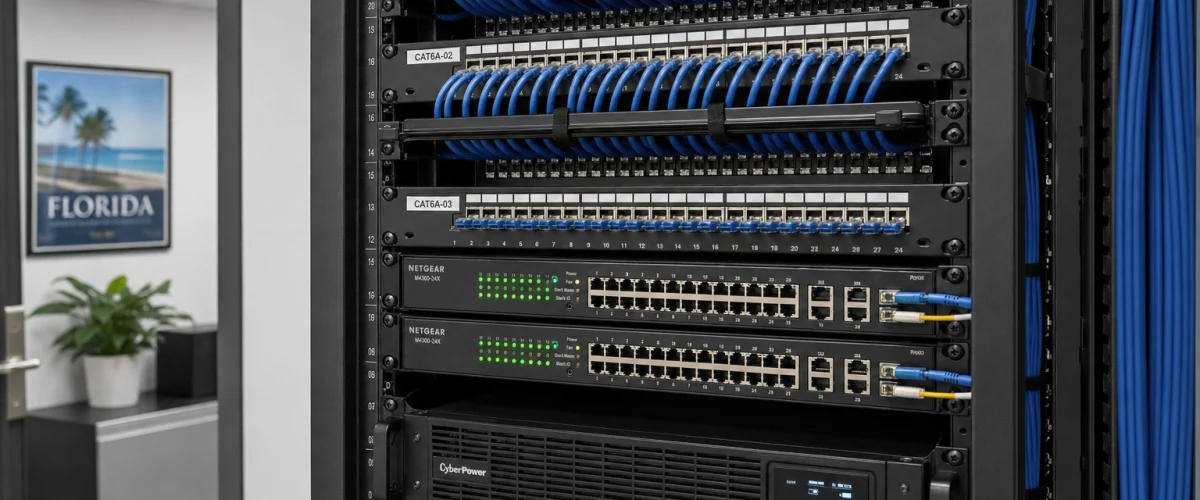
- Identify which network equipment needs power to keep VoIP running. Your router, managed switch, and any PoE (Power over Ethernet) switches that power desk phones all need electricity. Know which devices are on your UPS (uninterruptible power supply) and which are not.
- Test your UPS units. A UPS that has not been tested in two years may not hold a charge. Run a test before storm season and replace aging batteries. The FCC has published guidance on backup power for communications equipment that is worth reviewing.
- Confirm your internet circuit has a backup path. If your office has a single ISP connection, consider a secondary circuit from a different provider or a 4G/5G failover router. When the primary circuit goes down, the backup activates automatically — but only if it is configured before the storm.
- Label all network equipment clearly. During a post-storm recovery, a technician who has never been in your network closet needs to be able to identify what is what. Labeled patch panels and switches save hours. The BICSI standards for structured cabling documentation are a practical reference for any Florida office.
- Verify QoS settings on your router. Quality of Service rules prioritize voice traffic over other data. If your router’s QoS settings were never configured, call quality will degrade under load — especially when staff are working remotely on congested home networks.

Common Mistakes Florida Offices Make Before Storm Season
After reviewing phone systems across Orlando, Tampa, Miami, Jacksonville, and Winter Garden, these are the problems that show up most often when businesses are not prepared.
- Assuming the phone system will just work. A hosted VoIP system is resilient, but only if it is configured correctly. Assuming failover is active without testing it is the most common and most costly mistake.
- No documented storm-mode call flow. Most offices have a standard call flow. Very few have a documented alternate flow for when staff are evacuated or working from different locations.
- Outdated extension lists. Ring groups and call queues that include former employees or disconnected extensions waste ring time and delay calls reaching a live person.
- Relying on a national carrier’s support line during a regional disaster. When a major storm hits Florida, national carrier support queues fill up fast. A local provider with a Florida-based team is reachable when it matters.
- No backup internet path. A single ISP connection with no failover means that when the circuit goes down, so does every desk phone in the office — even on a hosted VoIP system.
- Waiting until after the storm to plan. Porting, configuration changes, and hardware procurement all take time. The checklist above only works if it is completed before a storm is in the forecast.
How Mynians VoIP Supports Outage Readiness
Mynians VoIP is the Florida business phone division of Mynians, a Winter Garden, Florida technology company with over two decades of hands-on experience. We serve businesses across Orlando, Tampa, Miami, Jacksonville, Winter Garden, and the surrounding areas.
Our hosted business VoIP plans start at $22.95 per licensed user per month (Essential, 5-user minimum) with Professional at $29.95 per licensed user per month (5-user minimum) and Enterprise starting at $39.95 per licensed user per month (10-user minimum, final quote required). Standard implementation is $149 for 5–9 users and included for 10 or more licensed users. All plans are month-to-month with 30-day cancellation notice. Hardware, taxes, fees, and quoted add-ons are separate.
What that means for storm readiness specifically:
- Cloud-based call routing means your numbers stay active and routable even when your office is offline.
- Mobile and desktop softphones let staff take and make business calls from anywhere with a data connection.
- Auto-attendants and call flows are configured by our team and can be updated remotely — no on-site visit required to activate a storm-mode greeting.
- Voicemail to email keeps messages accessible even when no one is in the office to check a physical voicemail box.
- Number porting handled end-to-end means if you are moving from a legacy system before storm season, our team manages the process and confirms timelines per site.
- Local Orlando-area support means you are not waiting in a national call queue when something needs to be fixed fast.
The wider Mynians company also provides managed IT, structured cabling, and video surveillance — so if your outage readiness review uncovers network or cabling gaps, we can address those too.
For businesses with healthcare call-handling requirements, our call flows can be configured to support applicable HIPAA obligations. We do not make compliance certifications on your behalf, but we build the workflows to support your obligations.
Ready to review your current setup? Call us at (407) 374-2782 or schedule a consultation and we will walk through your phone system, identify any gaps in your outage readiness, and give you a written quote based on your actual needs.
Run through this checklist with your team before June 1. If anything on the list is unconfigured, untested, or unclear, that is exactly what our free consultation is designed to address. We review your call routing, failover paths, device setup, and carrier records — and give you a written quote with no surprises.
Frequently Asked Questions
What happens to my VoIP phones when the power goes out at my Florida office?
Desk phones that rely on Power over Ethernet will go offline when power is lost, unless they are connected to a switch that is backed by a UPS. However, because hosted VoIP call routing lives in the cloud, your phone numbers remain active. Calls can be automatically forwarded to mobile devices or alternate numbers based on your failover configuration. This is why testing your failover routing before storm season is critical — the cloud side stays up, but you need a device with power and a data connection to receive those calls.
How do I test my phone system’s failover routing before hurricane season?
The simplest test is to temporarily disconnect your office internet router or disable your desk phones, then call your main business number from an outside line — a personal cell phone works fine. Observe where the call goes. Does it ring the correct mobile number or ring group? Does it reach a clear recorded message if no one answers? Document what you find and fix any routing rules that do not behave as expected. Repeat this test for every main inbound number your business uses.
Can I manage my call routing remotely during a storm evacuation?
Yes, with a hosted VoIP system. Your call routing rules, auto-attendant greetings, and ring group settings are managed through a cloud-based admin portal that is accessible from any device with an internet connection. This means you or your office manager can update call flows, activate a storm-mode greeting, or redirect calls to staff cell phones from anywhere — without needing to be in the office or touch any hardware.
How long does number porting take if I need to switch providers before storm season?
Number porting timelines vary depending on your current carrier, the type of numbers being ported, and your network readiness. There is no universal fixed timeline. Mynians VoIP handles number porting end-to-end and confirms the timeline per site after reviewing your network readiness, hardware, and porting requirements. If you are considering a switch before hurricane season, the earlier you start the process, the better. Contact us to get a realistic timeline for your specific situation.
What is the difference between Mynians VoIP and a national provider like RingCentral for Florida businesses?
The core VoIP features are comparable. The meaningful difference for Florida businesses is support. Mynians VoIP is based in Winter Garden, Florida, with an Orlando-area team that serves businesses across the state. When a storm hits and something needs to be fixed quickly, you are working with a local team that knows your setup — not waiting in a national support queue. Mynians also offers month-to-month service with 30-day cancellation notice, published per-licensed-user pricing starting at $22.95 per month, and site-specific implementation planning rather than a one-size-fits-all rollout.
Do I need a backup internet connection for VoIP to work during a storm?
For desk phones in your office, yes — if your primary internet circuit goes down, those phones go offline regardless of your VoIP provider. A secondary internet circuit from a different ISP, or a 4G/5G failover router, keeps your office phones online when the primary circuit fails. For staff working remotely on mobile devices, their cellular data connection serves as the backup path. The FCC has published guidance on backup communications that is useful for Florida businesses planning for extended outages.
Update Log
- October 2026: Created and reviewed for Mynians VoIP business phone system accuracy.
