
Front-Desk VoIP Transfer Checklist for Florida Offices
A missed transfer at the front desk is not just an annoyance — it is a lost caller, a frustrated client, and a gap in your business reputation. This checklist walks Florida receptionists, office managers, and operations leaders through every step of a reliable call-handling workflow: answering and identifying the caller, choosing the right transfer method, setting hold expectations, using call park correctly, defining voicemail fallback, and running supervised test calls before going live. Use it as a training guide, a pre-launch checklist, or a reference card posted at every reception station.
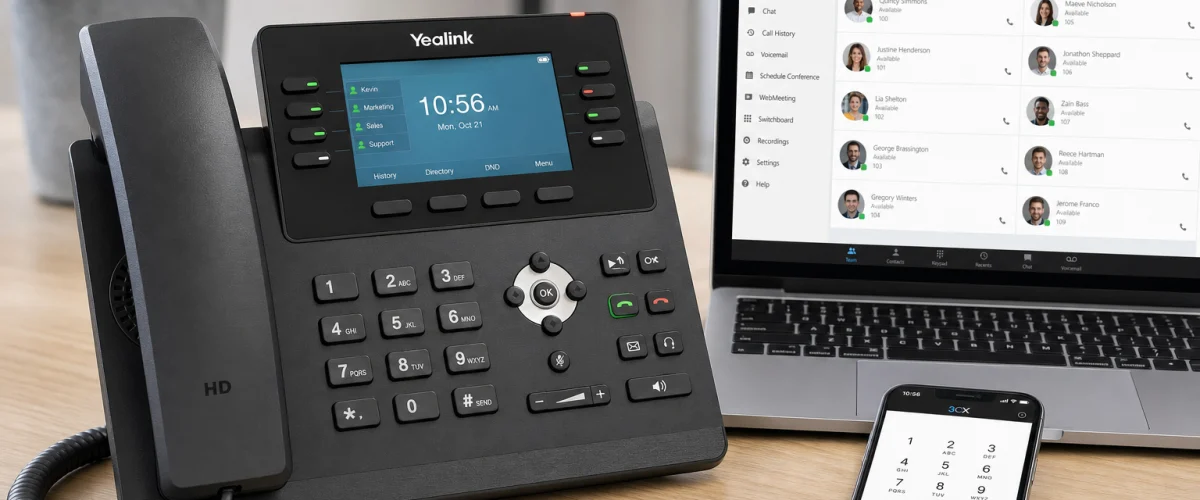
A solid front-desk VoIP transfer workflow covers six steps: answer and identify, choose attended or blind transfer, communicate hold expectations, park calls only with a confirmed retrieval method, define voicemail and overflow fallback, and run test calls from both internal extensions and external numbers. Getting all six right before launch eliminates the most common causes of dropped handoffs and missed calls in Florida offices.
- Attended (warm) transfers prevent blind drops — always announce the caller before releasing the line when the situation allows.
- Call park is only reliable when every staff member knows the retrieval extension or pickup code before the call is parked.
- Voicemail fallback and overflow routing must be configured and tested, not assumed.
- Run test calls from an external cell phone and from internal extensions before any front-desk VoIP system goes live.
- Mynians VoIP supports blind and attended transfer, call parking, simultaneous ring, and per-user routing rules — all configurable for Florida offices.

Who This Is For — and Who It Is Not
This checklist is built for:
- Florida receptionists and front-desk staff handling inbound calls daily
- Office managers setting up or auditing a VoIP phone system for the first time
- Operations leaders at multi-location Florida businesses — Orlando, Tampa, Miami, Jacksonville, Winter Garden — who need consistent call-handling across sites
- Businesses moving from a legacy landline or on-premise PBX to a hosted cloud phone system
- Healthcare front desks that need call flows configured to support applicable HIPAA obligations
This checklist is NOT for:
- Solo operators who handle all calls personally with no transfer needs
- Businesses satisfied with a consumer app and no call routing requirements
- IT administrators looking for deep SIP trunk or dial-plan engineering documentation
Transfer Options at a Glance: VoIP vs. Other Phone Systems
Before drilling into the checklist, it helps to understand what your phone platform actually supports. The table below compares common options Florida offices evaluate.
| Feature | Mynians VoIP (Hosted Cloud PBX) | National Providers (e.g., RingCentral, Nextiva) | AT&T Business Lines | Legacy On-Premise PBX | DIY Softphone Apps |
|---|---|---|---|---|---|
| Attended (warm) transfer | Yes — included | Yes — included | Varies by plan | Yes — hardware dependent | Limited |
| Blind transfer | Yes — included | Yes — included | Varies by plan | Yes — hardware dependent | Limited |
| Call park and pickup | Yes — included | Yes — included | Rarely included | Yes — requires programming | Rarely available |
| Per-user routing rules | Yes — configurable | Yes — configurable | Limited | Requires IT vendor | No |
| Voicemail to email | Yes — included | Yes — included | Add-on cost | Add-on or not available | No |
| Local Florida support | Yes — Orlando-based | No — national call center | No — national call center | Depends on vendor | No |
| Month-to-month service | Yes — 30-day cancellation | Often annual contract | Often annual contract | Hardware investment required | Yes |
| Installation planning | Site-specific review | Self-serve or remote | Scheduled technician | On-site vendor required | Self-serve only |
National providers offer similar features on paper, but when something breaks in your Orlando or Tampa office, you are calling a national support queue. Mynians VoIP is based in Winter Garden, Florida — real techs, real answers, local to the market they serve.
The single most common front-desk failure we see in Florida offices is a call parked with no retrieval plan. The receptionist parks the call, announces it over the intercom or walks to the back office, and by the time someone picks up the extension the caller has hung up. Before you park a single call, every person who might retrieve it needs to know the park orbit number or pickup code — and that information needs to be printed and posted at every desk, not memorized.

Step 1 — Answer and Identify the Caller
Every transfer starts with a clean answer. Before you can route a call correctly, you need two pieces of information: who is calling and what they need. A consistent greeting script removes guesswork.
Checklist items:
- Answer within three rings. If your system supports simultaneous ring across the front desk and a backup extension, confirm it is active.
- State the business name and your name clearly: “Good morning, Lakeside Dental, this is Maria — how can I help you?”
- Capture the caller’s name and the person or department they need before placing them on hold or initiating any transfer.
- If the caller’s need is unclear, ask one clarifying question before routing: “Are you calling about an existing account or a new inquiry?”
- Log the caller’s name and purpose in your CRM or call log if your workflow requires it — do this before transferring, not after.
Step 2 — Choose Attended (Warm) vs. Blind Transfer
This is the decision that determines whether the caller feels handled or dropped. Both transfer types are standard on a hosted cloud PBX, but they serve different situations.
Attended (warm) transfer
You place the caller on hold, dial the recipient’s extension, announce the caller and their purpose, confirm the recipient is ready, and then release the call. The caller never experiences a blind drop. Use this method for:
- VIP callers or known clients
- Callers with complex or sensitive inquiries
- Any situation where the recipient needs context before picking up
- Healthcare front desks where call-handling context matters for compliance workflows
Blind transfer
You transfer the call directly to an extension or number without announcing it first. The recipient’s phone rings and they answer cold. Use this method for:
- High call volume periods when hold time would be longer than the transfer itself
- Transfers to departments with their own greeting or auto-attendant
- Internal transfers to staff who have agreed to accept blind transfers for routine call types
Checklist items:
- Define in writing which call types get attended transfers and which get blind transfers.
- Confirm your VoIP system’s transfer button or softkey sequence with your provider before training staff — button labels vary by phone model.
- Train every front-desk staff member on both methods. Do not assume they know the difference.
- If a blind transfer goes to voicemail unexpectedly, have a recovery script ready: retrieve the caller and offer a message or callback.
Step 3 — Communicate Hold Expectations
Placing a caller on hold without explanation is one of the fastest ways to lose them. Cloud phone systems support hold music and hold messaging, but the human communication before the hold matters just as much.
Checklist items:
- Always tell the caller why you are placing them on hold and for how long: “I am going to place you on hold for about 30 seconds while I reach James.”
- If the hold extends beyond your stated time, return to the caller, update them, and give them the option to leave a voicemail or receive a callback.
- Confirm your hold music or messaging is active and professional — dead silence on hold reads as a dropped call to most callers.
- Set a maximum hold time policy. If the recipient does not answer within that window, the receptionist retrieves the caller rather than leaving them parked indefinitely.
Is your current phone system causing front-desk bottlenecks? Mynians VoIP configures call routing, transfer rules, and voicemail fallback for Florida offices — with local support from Winter Garden. Schedule a free VoIP consultation
Step 4 — Call Park and Pickup
Call parking lets you place a call in a shared “orbit” so any authorized extension can retrieve it — useful in open offices, warehouses, or multi-room practices where the intended recipient is away from their desk. It is a powerful feature that fails badly when staff do not know the retrieval process.
Checklist items:
- Confirm your park orbit numbers or pickup codes with your VoIP provider before training staff. These are typically programmable line-key features configured during setup.
- Post the park orbit number and pickup code at every desk and in every common area where a call might be retrieved.
- Establish a notification method before parking: overhead announcement, instant message, or a quick walk to the recipient. Never park a call and assume the recipient will know.
- Set a park timeout. If no one retrieves the parked call within your defined window (commonly 60–90 seconds), the call should ring back to the receptionist or route to voicemail — not drop.
- Test park and pickup with an external number before going live. Have a colleague call from a cell phone, park the call, and retrieve it from a different extension.
Step 5 — Voicemail and Overflow Fallback
Every transfer path needs a defined endpoint when the intended recipient does not answer. Voicemail and overflow routing are not backup plans — they are part of the primary call flow design.
Checklist items:
- Confirm every user extension has a recorded, professional voicemail greeting. Generic system greetings erode caller confidence.
- Enable voicemail-to-email for every user who needs to respond to messages promptly. This ensures messages are not missed when staff are away from their desk phones.
- Define overflow routing: if the front desk does not answer within a set number of rings, where does the call go? Options include a secondary extension, a ring group, an auto-attendant, or a voicemail box.
- For after-hours calls, confirm your auto-attendant or per-user routing rules direct callers to the correct after-hours message or on-call extension.
- For Florida offices in hurricane-prone areas, confirm your failover routing is configured. If your office loses power or internet, calls should route to a mobile softphone or an alternate number — not drop.
- Healthcare front desks: confirm that voicemail and call-flow configurations are reviewed against applicable HIPAA obligations before go-live.

Step 6 — Document Exceptions
Every office has edge cases: the executive who never wants calls transferred blind, the department that uses a shared extension, the after-hours on-call rotation that changes weekly. Undocumented exceptions become training failures and missed calls.
Checklist items:
- Create a one-page call-routing reference card for the front desk. Include: extension directory, transfer method by call type, park orbit numbers, voicemail fallback rules, and after-hours routing.
- Document any staff member with a non-standard routing preference and share it with every receptionist.
- Update the reference card whenever staff changes, extensions change, or routing rules are modified. Assign one person ownership of this document.
- Store the reference card in a shared drive and print a laminated copy for each reception station.
Step 7 — Run Supervised Test Calls
No checklist replaces a live test. Before your VoIP system handles real callers, run a structured test sequence that covers every transfer scenario your front desk will encounter.
Test call sequence:
- External inbound to attended transfer: Call your main number from a cell phone. Have the receptionist perform a warm transfer to an internal extension. Confirm the recipient hears the caller introduction and the call connects cleanly.
- External inbound to blind transfer: Repeat the above with a blind transfer. Confirm the recipient’s phone rings and the call connects without the receptionist on the line.
- External inbound to call park and pickup: Call in, have the receptionist park the call, notify a colleague, and have that colleague retrieve it from a different extension. Confirm audio quality on both ends.
- Transfer to voicemail: Transfer a test call to an extension that is set to do-not-disturb or unavailable. Confirm the call routes to voicemail and the voicemail-to-email notification arrives.
- Overflow and after-hours routing: Test your after-hours auto-attendant by calling in outside business hours. Confirm the correct greeting plays and the overflow route works as configured.
- Failed transfer recovery: Simulate a blind transfer that goes unanswered. Confirm the receptionist can retrieve the caller before the call drops or routes to an unintended destination.
- Mobile softphone test: If your staff use mobile or desktop softphones, confirm transfers to and from softphone extensions work the same as desk phones.
Checklist items:
- Run every test from both an internal extension and an external cell phone number.
- Have a supervisor or manager observe and document results — do not self-certify.
- Repeat any failed test after the issue is corrected. Do not go live until all scenarios pass.
- Schedule a follow-up test in the first week after launch to catch issues that only appear under real call volume.
If you are setting up Florida business VoIP for the first time or migrating from a legacy system, Mynians walks through this test sequence with you as part of the implementation review — not as an afterthought.
Frequently Asked Questions
What is the difference between an attended transfer and a blind transfer on a VoIP system?
An attended transfer — also called a warm transfer — means the receptionist places the caller on hold, dials the recipient, announces the caller and their purpose, and then releases the call only after the recipient confirms they are ready. A blind transfer sends the call directly to the recipient’s extension without any introduction. Attended transfers reduce dropped handoffs and are preferred for complex or sensitive calls. Blind transfers are faster and work well for high-volume routing to departments with their own greeting.
How does call park work and why does it fail?
Call park places an active call in a shared orbit — a numbered slot that any authorized extension can dial to retrieve the call. It fails most often when the person who parked the call does not notify the intended recipient, or when the recipient does not know the park orbit number or pickup code. The fix is simple: post the park orbit number at every desk, establish a notification method before parking, and set a timeout so the call rings back to the receptionist if no one retrieves it within a defined window.
What should happen when a transfer goes to voicemail unexpectedly?
If a blind transfer routes to voicemail when the caller expected a live answer, the receptionist should have a recovery script ready. The best practice is to configure your system so that unanswered blind transfers ring back to the front desk after a set number of rings, giving the receptionist the chance to retrieve the caller and offer a message or callback rather than leaving the caller in an unmonitored voicemail box.
How should Florida offices handle after-hours and hurricane-season call routing?
After-hours routing should be configured in your auto-attendant or per-user routing rules so callers hear a professional message and reach an on-call extension or voicemail rather than a dead line. For hurricane-season outages, failover routing should direct calls to mobile softphones or an alternate number if your office loses power or internet. This needs to be configured and tested before storm season, not during it. Mynians VoIP includes failover and redundancy configuration as part of its hosted cloud PBX service for Florida businesses.
How much does Mynians VoIP cost for a Florida office?
Mynians VoIP is priced per licensed user per month. The Essential plan is $22.95 per licensed user with a 5-user minimum. The Professional plan is $29.95 per licensed user with a 5-user minimum. The Enterprise plan starts at $39.95 per licensed user with a 10-user minimum and requires a final quote. Standard implementation is $149 for 5 to 9 users and is included for 10 or more users. Hardware, taxes, fees, and quoted add-ons are separate. Service is month-to-month with 30-day cancellation notice. Installation and porting timelines are confirmed per site after reviewing network readiness, hardware, and porting requirements.
What happens on a free VoIP consultation with Mynians?
On a free consultation, a Mynians VoIP team member reviews your current phone setup, call volume, number of users, locations, and any specific routing or compliance requirements. From there, they provide an itemized written quote based on your actual needs — not a generic package. There is no obligation and no pressure. You can schedule directly at voip.mynians.com/schedule-consultation/ or call (407) 374-2782.
If your front-desk call handling has gaps — missed transfers, parked calls that drop, voicemail boxes no one checks — Mynians VoIP can review your current setup and configure a call flow that actually works. We serve Florida businesses across Orlando, Winter Garden, Tampa, Miami, and Jacksonville with local support, published per-licensed-user pricing, and month-to-month service. No surprise bills, no national call-center runaround.
Update Log
- October 2026: Created and reviewed for Mynians VoIP business phone system accuracy.
