

Ultimate Guide to Business Phone System Backup Internet Setup
A reliable business phone system backup internet setup is one of the most important investments a small or mid-sized business can make. For Florida SMBs, where hurricanes and power disruptions are real operational risks, phone downtime can mean lost revenue and damaged client relationships. This guide covers everything you need to plan, build, and maintain a resilient phone system.
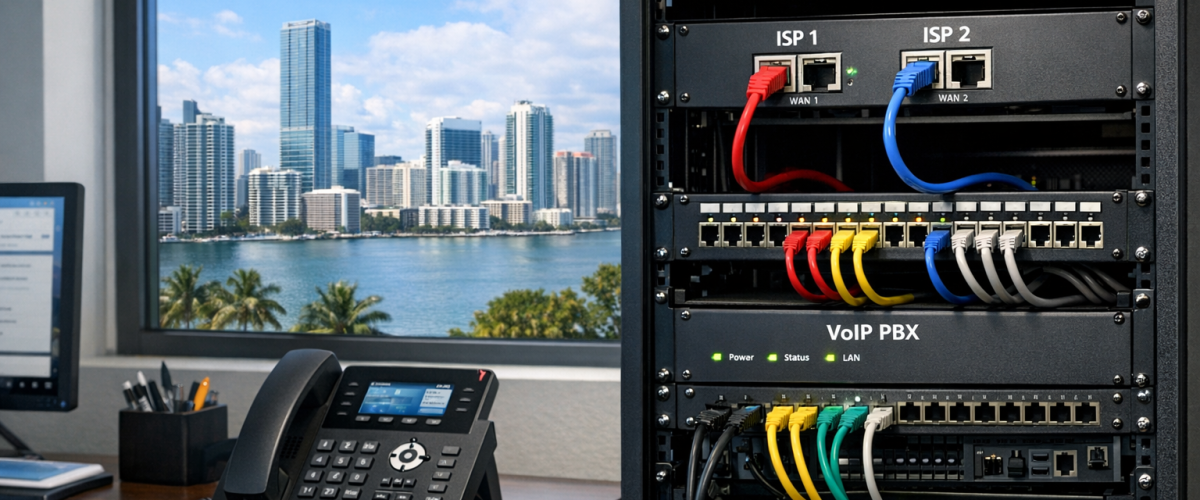
A business phone system backup internet setup combines a secondary internet connection with redundant call routing so that incoming and outgoing calls continue even when your primary connection fails. Most SMBs can achieve this using a VoIP provider with failover routing and a 4G LTE or secondary broadband line as a backup path.
Last Updated: September 2026
Table of Contents
- Understanding Business Phone System Backups
- Importance of Call Routing for SMBs
- How to Set Up a Backup Internet Connection
- Choosing the Right Call Routing Solutions
- Best Practices for Improving Phone System Uptime
- Common Mistakes to Avoid
- Practical Steps to Get Started
- Downloadable Resource
- Frequently Asked Questions
Key Takeaways
- A secondary internet connection is the foundation of any phone system redundancy plan.
- VoIP failover routing can redirect calls automatically within seconds of an outage.
- Florida SMBs face unique risks from weather events that make backup planning essential.
- Proper call routing setup reduces missed calls and protects revenue during disruptions.
Methodology
This guide is based on analysis of VoIP provider documentation, network engineering best practices, and publicly available case data from SMB deployments. Recommendations reflect configurations suitable for businesses with 5 to 100 employees operating in regions with variable internet reliability.
Understanding Business Phone System Backups
A phone system backup is any configuration that keeps your office phones operational when your primary infrastructure fails. Modern businesses rely on VoIP systems that transmit calls over the internet. When that internet connection drops, calls fail unless a backup path exists.
Phone system redundancy typically involves three layers: a secondary internet connection, a VoIP provider with built-in failover, and call routing rules that activate automatically. According to the FCC’s guidance on VoIP services, businesses should understand how their phone systems behave during power and internet outages before an emergency occurs.
Importance of Call Routing for SMBs
Call routing setup determines where incoming calls go when your primary system is unavailable. For SMBs, poor routing means customers reach a busy signal or voicemail instead of a live agent. This directly affects customer satisfaction and sales conversion.
Effective call routing for a Florida business phone system should include geographic failover, time-based rules, and mobile forwarding. If your office loses power during a storm, calls should automatically forward to employee cell phones or a remote call center without manual intervention.
The NIST Communications Technology Laboratory publishes standards relevant to business communication resilience that SMBs can reference when evaluating their current setup.
How to Set Up a Backup Internet Connection
Setting up a backup internet connection for your phone system involves selecting a secondary ISP or mobile data provider, configuring a dual-WAN router, and testing automatic failover. Here are the core steps:
- Choose a secondary connection type. 4G LTE or 5G cellular backup is the most common choice for SMBs because it operates on a separate infrastructure from cable or fiber.
- Install a dual-WAN router. Devices from vendors like Cisco Meraki or Peplink support automatic failover between two internet connections with minimal configuration.
- Set failover thresholds. Configure the router to switch to the backup connection when packet loss exceeds 5 percent or latency exceeds 150 milliseconds.
- Test the failover. Disconnect your primary connection manually and confirm that calls continue without interruption.
Choosing the Right Call Routing Solutions
The right call routing solution depends on your business size, call volume, and budget. Most cloud VoIP providers include basic failover routing in their standard plans. Look for providers that offer:
- Automatic failover to mobile numbers
- Hunt groups and ring-all configurations
- Time-of-day routing rules
- Voicemail-to-email transcription as a fallback
Prices verified March 2026. Pricing may vary by promotions, billing cycle, and add-on features.
Entry-level VoIP plans with failover features typically range from $20 to $45 per user per month. Enterprise-grade solutions with advanced routing and analytics can reach $75 or more per user. Review Google Search Central’s content quality guidelines if you are also evaluating how your business communicates its services online, as E-E-A-T signals matter for digital visibility alongside operational reliability.
Best Practices for Improving Phone System Uptime
Improving office phone uptime requires both technical and procedural measures. The following practices are recommended for Florida SMBs:
- Use a UPS battery backup for your router and VoIP equipment to maintain connectivity during brief power outages.
- Document your failover configuration so any staff member can verify the system is working correctly.
- Schedule quarterly failover tests to confirm that backup routing activates as expected.
- Monitor call quality metrics using your VoIP provider’s dashboard to catch degradation before it causes an outage.
- Review your SLA with your ISP to understand guaranteed uptime and compensation terms.
Common Mistakes to Avoid
Many SMBs invest in backup hardware but still experience failures due to avoidable configuration errors. The most common mistakes include:
- No failover testing. Installing backup hardware without testing it means you will discover problems during an actual outage.
- Wrong search intent when selecting providers. Choosing a VoIP provider based on price alone without verifying failover capabilities leads to gaps in coverage.
- Weak internal routing rules. Failing to configure time-based and geographic routing means calls still fail even when the internet connection is active.
- Missing compliance review. Some industries have regulatory requirements for call recording and availability. Florida businesses in healthcare or finance should verify compliance before deploying new systems.
- Overlapping phone numbers. Assigning the same DID to multiple failover paths without proper priority rules causes call conflicts.
Practical Steps to Get Started
- Audit your current phone system and identify single points of failure.
- Contact your ISP to confirm whether your current plan includes any redundancy features.
- Request quotes from at least two cloud VoIP providers that offer documented failover routing.
- Purchase and install a dual-WAN router appropriate for your office size.
- Configure failover thresholds and call routing rules in your VoIP dashboard.
- Run a full failover test during a low-traffic period and document the results.
- Schedule a follow-up review in 90 days to assess performance and adjust settings.
For businesses that want expert guidance, scheduling a consultation with a local telecom specialist familiar with FCC small business communication resources can accelerate the process significantly.
Downloadable Resource
Use the template below to organize your keyword and routing configuration planning in one place. It includes fields for provider comparison, failover thresholds, and test schedules.
Download the keyword clustering template
Frequently Asked Questions
What is the fastest way to add phone system redundancy?
The fastest option for most SMBs is enabling mobile failover through your existing VoIP provider. This requires no new hardware and can be configured in under an hour.
Do I need a second ISP or will a cellular backup work?
A cellular backup is sufficient for most SMBs with moderate call volumes. Businesses handling more than 50 simultaneous calls may benefit from a dedicated secondary ISP connection.
How often should I test my backup phone system?
Quarterly testing is the minimum recommended frequency. Businesses in hurricane-prone areas of Florida should test before the start of each storm season.
Will my existing phones work on a backup connection?
Most modern IP phones and softphones will automatically reconnect through a backup internet path if your router handles the failover. Confirm this with your VoIP provider before relying on it.


