
Move From PBX to Hosted VoIP Without Downtime
Your old PBX has served its time. Maybe the hardware is failing, the vendor no longer supports it, or the monthly maintenance bills have quietly crept past what a modern hosted system would cost. Whatever the trigger, the question Florida business owners ask most is the same: Can we make the switch without dropping calls or losing our numbers? The answer is yes — if the migration is planned correctly. This guide walks you through every stage, from pre-migration readiness to cutover day, so your phones keep ringing through the entire transition.
Migrating from a legacy PBX to hosted VoIP without downtime requires three things done in the right order: network readiness before cutover, number porting started early (typically 2–4 weeks ahead), and a parallel-run period where both systems are live. Working with a local provider who handles porting end-to-end and can be on-site the day of cutover eliminates most of the risk.
- Start number porting 2–4 weeks before your target cutover date — it is the longest lead-time item in any PBX migration.
- Your internet connection and LAN must be assessed before any VoIP hardware is ordered or provisioned.
- A parallel-run period — both PBX and hosted VoIP active simultaneously — is the safest cutover method for most Florida businesses.
- Hosted VoIP from Mynians starts at $22.95 per licensed user per month with no contracts and includes end-to-end number porting.
- 72-hour installs are available across major Florida markets when the site is ready.
- Local on-site support on cutover day is not optional for businesses that cannot afford dropped calls.
Who This Is For — and Who It Is Not
This guide is for you if:
- You are running a Panasonic, NEC, Avaya, Cisco, or similar on-premise PBX that is aging, unsupported, or too expensive to maintain.
- You manage a Florida business with 5 or more phone lines across one or multiple locations.
- You need to keep your existing business phone numbers during the switch.
- You want predictable per-licensed-user pricing with no surprise bills.
- You have been burned by long install waits from national carriers and want a local team that can actually show up.
This guide is NOT for you if:
- You are a solo operator with one or two lines and no call routing needs — a basic residential VoIP app may be sufficient.
- Your current PBX is under active vendor support and under three years old with no reliability issues.
- Your internet connection is below 10 Mbps symmetrical and you are not willing to upgrade it — VoIP call quality depends on bandwidth and latency.

PBX Migration Options Compared
Before committing to a path, it helps to see the real differences between your options side by side.
| Option | Upfront Cost | Monthly Cost | Install Timeline | Porting Included | Local On-Site Support | Contract |
|---|---|---|---|---|---|---|
| Mynians VoIP (Hosted) | Low — phones only | From $22.95 per licensed user | 72 hours (site-ready) | Yes, end-to-end | Yes — Orlando-based team | Month-to-month |
| RingCentral | Low | Varies by tier | Self-provisioned or weeks | Partial — you manage it | No — national call center | Annual typical |
| Nextiva | Low | Varies by tier | Self-provisioned or weeks | Partial | No — national call center | Annual typical |
| AT&T Business VoIP | Medium | Higher per line | 2–6 weeks typical | Yes, but slow | Limited local dispatch | 1–3 year contracts |
| Keep Legacy PBX | Ongoing maintenance | High (parts + support) | N/A | N/A | Depends on vendor | Varies |
| DIY Softphone Apps | Very low | Very low | Immediate | No | None | None |
The comparison above reflects general market positioning. Exact pricing for your specific line count and feature needs is confirmed on a free consultation call — not guessed at in a quote form.
Step 1 — Pre-Migration Planning
A PBX migration that goes wrong almost always fails in the planning phase, not on cutover day. Before anything is ordered or ported, you need a clear inventory of what you have and what you need.
Audit your current system
- List every phone number your business uses, including main lines, direct-dial extensions, fax lines, and alarm or elevator lines.
- Document your current call routing: auto-attendant menus, ring groups, hunt groups, hold music, voicemail boxes, and after-hours routing.
- Identify any analog devices still connected to the PBX — fax machines, door intercoms, credit card terminals — that may need an ATA (analog telephone adapter) rather than a VoIP handset.
- Pull your current phone bill and identify every line item. Many Florida businesses discover they are paying for lines they no longer use.
Define your new call flow before cutover
Your hosted VoIP system should be fully configured and tested in a staging environment before a single number is ported. That means your auto-attendant greetings are recorded, your ring groups are built, your voicemail-to-email is verified, and your mobile softphones are installed on staff devices. Cutover day is not the time to be writing hold music scripts.
The single most common delay we see in PBX migrations is businesses that have not documented their existing call routing. When we ask “how does your after-hours call flow work today?” the answer is often “we’re not sure.” Spend one hour mapping your current call tree before your first planning call with us — it cuts the configuration phase in half and prevents surprises on cutover day.
Step 2 — Number Porting Coordination
Number porting is the process of transferring your existing business phone numbers from your current carrier to your new VoIP provider. It is the longest lead-time item in any migration and the area where most DIY migrations run into trouble.
How porting works
Your new provider submits a Letter of Authorization (LOA) and a copy of your current phone bill to your losing carrier. The losing carrier has a regulated window to approve or reject the port request. The FCC’s number portability rules require carriers to port numbers in a timely manner, but delays happen — especially when account information on the LOA does not exactly match the losing carrier’s records.
Typical porting timeline
- Simple ports (1–5 numbers, same carrier type): 5–10 business days
- Complex ports (10+ numbers, toll-free, or multi-location): 2–4 weeks
- Ports involving AT&T, Lumen, or Windstream legacy lines in Florida: allow 3–4 weeks minimum
What can go wrong — and how to prevent it
- Account mismatch: The name or address on the LOA does not match the losing carrier’s records. Fix: pull your current bill and copy the account name exactly.
- Canceling service too early: If you cancel your old carrier before the port completes, your numbers can be lost permanently. Never cancel until the port is confirmed complete.
- Forgetting fax or alarm lines: These numbers are often on separate accounts. Audit every line before submitting the LOA.
Mynians handles number porting end-to-end. You provide the bill and sign the LOA — we manage the submission, track the port order, and coordinate the cutover date around the confirmed port completion.

Step 3 — Onsite Network Readiness
Hosted VoIP runs over your internet connection. If your network is not ready, call quality will suffer regardless of which provider you choose. This is the step most national VoIP providers skip entirely — they ship you phones and wish you luck.
Bandwidth requirements
A general rule of thumb: each active VoIP call requires approximately 100 Kbps of symmetrical bandwidth using standard codecs. A 10-line office making simultaneous calls needs at least 1 Mbps dedicated to voice — but your internet connection also carries data traffic, video, and cloud applications. A realistic minimum for a 10-line Florida business office is a 50 Mbps symmetrical fiber or cable connection with QoS (Quality of Service) configured on the router.
Network configuration checklist
- QoS rules on your router or firewall that prioritize voice traffic (DSCP marking)
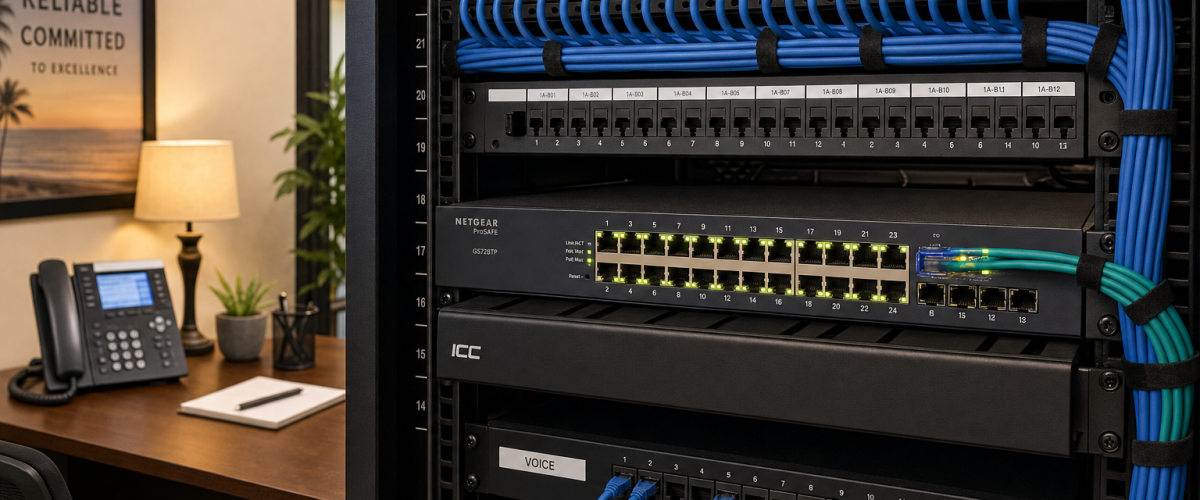
- A managed switch with VLAN support to separate voice and data traffic
- PoE (Power over Ethernet) switch ports if you are deploying IP desk phones
- Firewall rules that allow SIP and RTP traffic on the correct ports
- UPS (uninterruptible power supply) on your network equipment so a brief power flicker does not drop active calls
Mynians is one of the few Florida VoIP providers that also handles structured cabling and network infrastructure through the wider Mynians team. If your patch panel is a mess or your switches are consumer-grade, that gets fixed before the phones go in — not after your first dropped call.
Not sure if your network is VoIP-ready? We will assess your connection, switches, and cabling as part of the free consultation — no obligation. Schedule a free VoIP consultation
Step 4 — Cutover Day Execution
Cutover day is when your business transitions from the old PBX to the hosted VoIP system. Done correctly, your staff notices nothing except that the phones look different. Done incorrectly, calls go to voicemail, customers get busy signals, and your front desk is fielding complaints instead of calls.
The parallel-run method
The safest approach for most Florida businesses is a parallel run: your hosted VoIP system is fully provisioned and tested on temporary numbers before your main business numbers are ported over. Staff can make and receive test calls, learn the new handsets, and verify voicemail routing — all while the old PBX is still handling live customer calls. When the port completes and your numbers flip to the new system, the transition is instant and tested.
Cutover day checklist
- Confirm port completion with your provider before touching the old PBX
- Test inbound calls to every main number and direct-dial extension
- Test outbound caller ID on all lines
- Verify auto-attendant routing for business hours and after-hours
- Test voicemail-to-email delivery on at least three mailboxes
- Confirm mobile softphones are receiving calls on staff cell phones
- Leave the old PBX powered on but unplugged from the PSTN for 48 hours as a fallback
Typical installation timing after site readiness and port clearance
Most Mynians VoIP installs go live within 72 hours once the site is ready and the numbers clear to port; the system is built and tested before the scheduled cutover. That timeline assumes cabling is in place and the port order is already in progress — not that you called us on Monday and expect dial tone by Wednesday with nothing prepared.
Step 5 — Post-Cutover Stabilization
The first two weeks after cutover are when small issues surface. A ring group that was configured incorrectly, a voicemail box that was not set up for a new employee, or a call queue that needs its timeout adjusted. This is normal — and it is where local support makes a real difference.
- Schedule a one-week check-in call with your provider to review any call quality complaints or routing issues.
- Confirm your outage and failover plan is documented and you know how to report an outage.
- Update your business listings, website, and Google Business Profile if any numbers changed.
- Formally cancel your old PBX maintenance contract and carrier service only after two weeks of clean operation on the new system.

Common Mistakes That Cause Downtime During PBX Migration
- Canceling the old carrier before the port is confirmed complete. This is the fastest way to lose your business phone numbers permanently.
- Skipping the network assessment. Plugging VoIP phones into a network with no QoS and a consumer-grade router produces choppy, robotic audio that drives customers away.
- Ordering phones before the call flow is designed. Hardware sitting in boxes while you figure out your auto-attendant tree delays the entire project.
- Using a national provider with no local dispatch. When something goes wrong on cutover day, a ticket number and a callback window is not the same as a technician who can be at your office in an hour.
- Forgetting analog devices. A fax machine or door intercom still wired to the old PBX will stop working the moment the PBX is decommissioned unless an ATA is installed.
- No failover plan. If your internet goes down, what happens to inbound calls? A properly configured hosted VoIP system can failover to mobile numbers or a backup SIP trunk automatically.
Florida-Specific Considerations
Hurricane season and failover
Florida businesses face a real and recurring risk that most national VoIP providers do not design for: extended power and internet outages during hurricane season. A hosted VoIP system with properly configured failover can route inbound calls to mobile softphones or an offsite number automatically when your primary internet connection goes down. Your customers keep reaching a live person even when your office is dark. This is not a theoretical feature — it is a configuration decision that needs to be made before the storm, not during it.
Multi-location call handoffs
Many Florida businesses operate across multiple locations — a main office in Orlando, a satellite office in Tampa, and a remote team in Miami. A hosted VoIP system with a unified cloud PBX lets you transfer calls between locations as if they were extensions on the same system, without per-transfer charges or confusing external call routing.
HIPAA call-handling for healthcare businesses
Florida healthcare practices, dental offices, and medical billing companies have specific requirements around how calls are recorded, stored, and routed. Mynians offers healthcare call-flow configurations designed to support a HIPAA compliance program for healthcare clients. If your practice is migrating from an old PBX, this is a configuration requirement — not an add-on to think about later.
Weeks-long waits from national carriers
Florida businesses that have tried to get a new phone system through AT&T, Comcast Business, or a national VoIP brand know the experience: a sales call, a contract, a shipping box, and then weeks of waiting for a provisioning team that may or may not show up. Mynians operates as a local team. When you schedule a consultation, you are talking to the same team that will configure your system and be on-site on cutover day.
Frequently Asked Questions
How long does it take to migrate from a PBX to hosted VoIP?
The total timeline depends on two variables: how long your number port takes and how quickly your site can be made network-ready. For most Florida businesses, the full migration from first planning call to live cutover takes two to four weeks. The porting process is typically the longest item, running 5–10 business days for simple ports and up to four weeks for complex or legacy carrier ports. Most Mynians VoIP installs go live within 72 hours once the site is ready and the numbers clear to port; the system is built and tested before the scheduled cutover.
Will I lose my existing business phone numbers when I switch?
No — your existing numbers are portable under FCC regulations. As long as you do not cancel your current carrier service before the port is complete, your numbers transfer to the new hosted VoIP system. Mynians handles the porting process end-to-end, including submitting the Letter of Authorization, tracking the port order, and coordinating the cutover date around the confirmed port completion date.
What happens to my calls if my internet goes down?
A properly configured hosted VoIP system includes failover routing. When your primary internet connection goes down, inbound calls can be automatically routed to mobile softphones, a backup number, or a secondary SIP trunk. This failover behavior is a configuration decision made during setup — not something that activates automatically without planning. Mynians configures failover as part of every installation, which is especially important for Florida businesses during hurricane season.
How much does hosted VoIP cost compared to maintaining an old PBX?
Mynians VoIP plans start at $22.95 per licensed user per month for the Essential plan (five-licensed-user minimum), $29.95 per licensed user for Professional, and starting at $39.95 per licensed user for Enterprise (ten-licensed-user minimum). These are month-to-month with no contracts. Legacy PBX maintenance costs vary widely depending on hardware age, vendor support availability, and whether you are still paying for POTS lines or a PRI circuit. The exact savings for your specific situation are confirmed on the free consultation call, where we review your current bill line by line.
What is included in the free VoIP consultation?
The free consultation includes a review of your current phone bill, a line-by-line quote for your specific business, an assessment of your network readiness for VoIP, and a discussion of your call routing requirements. You will speak with a real technician from the Mynians team — not a sales script from a national call center. There is no obligation to purchase. Call (407) 374-2782 or visit the consultation page to book a time.
Do I need new phones, or can I keep my existing handsets?
It depends on what you currently have. Many modern IP phones from brands like Polycom, Yealink, and Cisco can be re-provisioned for a new hosted VoIP provider. Older analog handsets connected to a traditional PBX require either replacement with IP phones or an ATA adapter. During the pre-migration audit, Mynians will identify which devices can be reused and which need to be replaced, so there are no surprises in the hardware budget.
Number porting is usually the step that decides whether a migration goes smoothly. See how to port Florida business numbers to VoIP safely.
Update Log
- August 2026: Created and reviewed for Mynians VoIP business phone system accuracy.
If your PBX is aging, your maintenance bills are climbing, or you have been putting off this migration because you are worried about downtime — this is the call that removes the guesswork. Mynians will review your current phone bill, assess your network, and give you a line-by-line quote with no obligation. Real techs, real answers, local support across Florida.
