
VoIP for Florida Dental Offices: HIPAA-Friendly Workflows
Your front desk is the first impression patients get of your practice. If calls are dropping, hold times are long, appointment reminders are inconsistent, or your after-hours message is a generic voicemail from 2014, you are losing patients before they ever sit in the chair. Florida dental offices need a phone system built around how a busy practice actually operates — not a one-size-fits-all carrier plan designed for a retail store. This guide covers exactly how VoIP for dental offices in Florida works in practice: call routing, appointment workflows, missed-call recovery, and keeping patient communication organized and compliant.
Florida dental offices can replace aging phone systems with hosted VoIP that handles front-desk call queues, auto-attendant routing, appointment reminder callbacks, and after-hours coverage — all on a call flow designed to stay HIPAA-friendly. Mynians VoIP offers plans starting at $22.95 per licensed user per month with no contracts, local Orlando-based support, and installs completed in as little as 72 hours when the site is ready.
- Hosted VoIP replaces legacy landlines with call queues, auto-attendants, and voicemail-to-email built for a busy front desk.
- HIPAA-friendly call flows are a configuration decision — your phone system vendor needs to understand what that means operationally.
- Missed calls cost dental practices real revenue. VoIP gives you the tools to recover them automatically.
- Mynians VoIP installs in as little as 72 hours across major Florida markets when the site is ready, with number porting handled end-to-end.
- Plans start at $22.95 per licensed user per month with no long-term contracts and local support from a Winter Garden, Florida team.
Phone System Options: Side-by-Side Comparison
Before diving into workflows, here is an honest look at the options a Florida dental practice manager is likely evaluating.
| Option | Starting Cost | Contract | Local Support | HIPAA Call Flow Config | Install Speed | Porting Handled |
|---|---|---|---|---|---|---|
| Mynians VoIP | $22.95 per licensed user/mo | Month-to-month | Yes — Orlando, FL team | Yes, configured locally | 72 hrs when site ready | Yes, end-to-end |
| RingCentral | ~$20+/line/mo | Annual typical | National call center | Available, self-configured | Weeks typical | Partial |
| Nextiva | ~$18+/line/mo | Annual typical | National call center | Available, self-configured | Weeks typical | Partial |
| AT&T Business | Varies widely | Multi-year common | Regional dispatch | Limited | Weeks to months | Managed by carrier |
| Legacy PBX / Landline | High upfront hardware | N/A | Depends on vendor | Difficult to configure | Days to weeks | Varies |
| DIY Softphone Apps | Low/free | None | None | Not configured | Immediate | No |
The national providers can work, but dental offices in Orlando, Tampa, Miami, and Jacksonville consistently report the same frustrations: long hold times with support, self-service portals that require IT knowledge to configure, and porting delays that leave a practice without phones for days. A local team that picks up the phone matters when your front desk goes down on a Monday morning.

Who This Is For (and Who It Is Not)
This guide is for you if:
- You manage or own a dental practice in Florida with two or more front-desk lines.
- Your current phone system drops calls, lacks a proper hold queue, or has no after-hours routing.
- You are paying for lines you do not use or getting surprise charges on your carrier bill.
- You want appointment reminder callbacks and missed-call recovery without buying a separate platform.
- You have a second or third location and need calls to route intelligently between offices.
- You are concerned about keeping patient call handling organized and compliant.
This is NOT for you if:
- You are a solo practitioner with one line and no front-desk staff — a basic consumer VoIP app may be sufficient for now.
- You are looking for a full patient engagement platform with integrated scheduling software — VoIP handles the phone layer; your practice management software handles the rest.
- You need fewer than five lines — Mynians VoIP Essential plans require a five-licensed-user minimum.
Front-Desk Call Routing for Dental Offices
A dental front desk handles a mix of call types simultaneously: new patient inquiries, appointment confirmations, insurance questions, billing calls, and urgent same-day requests. A legacy phone system with two or three lines and a basic hold button is not built for that volume.
Auto-Attendant Setup
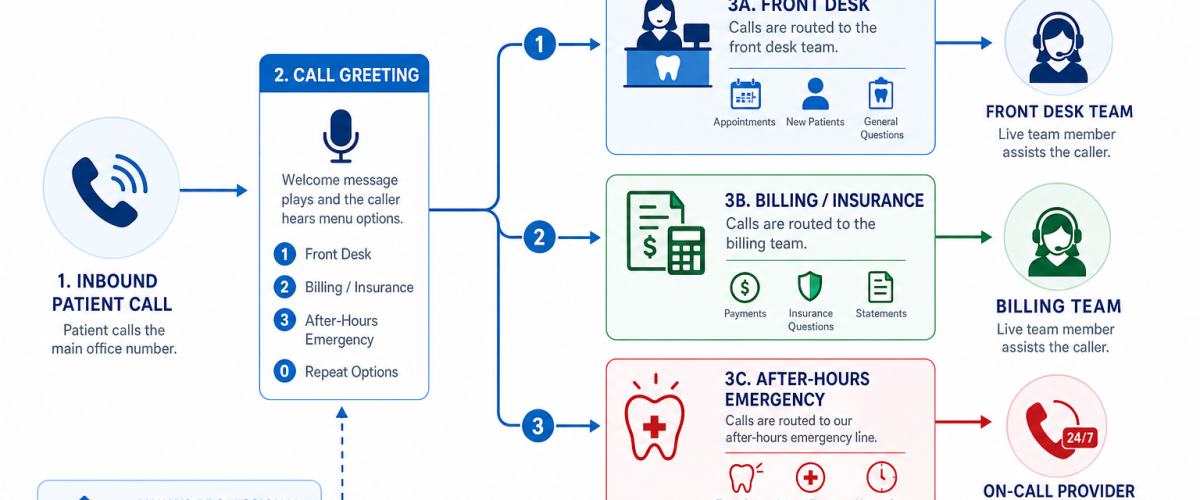
A properly configured auto-attendant greets callers immediately and routes them without requiring a live person to answer every call. For a dental office, a practical menu might look like this:
- Press 1 to schedule or confirm an appointment
- Press 2 for billing and insurance questions
- Press 3 for an existing patient with an urgent concern
- Press 0 to reach the front desk directly
This is not about replacing your front desk — it is about making sure every caller lands in the right place without being put on hold while someone figures out who should take the call.
Call Queues
When all front-desk lines are busy, a call queue holds callers in order and plays a message rather than sending them to a busy signal or generic voicemail. You can configure estimated wait messages, music on hold, and overflow rules — for example, if a caller has been waiting more than two minutes, the call rolls to a mobile softphone carried by the office manager.
The most common front-desk problem we see in Florida dental offices is not the number of lines — it is the lack of a queue. Callers hit a busy signal and call the next practice on Google. A call queue with a simple hold message keeps that patient on the line. We configure this during setup, not as an add-on you have to figure out later.
Appointment Reminders and Callback Workflows
VoIP does not replace your practice management software for scheduling, but it integrates with the phone layer in ways that reduce no-shows and front-desk workload.
Outbound Reminder Calls
With a hosted VoIP system, your front desk can initiate outbound reminder calls from the same business number patients already recognize. Calls from an unfamiliar number get ignored — calls from your practice number get answered. This is a simple operational detail that makes a measurable difference in callback rates.
Voicemail to Email
When a patient leaves a voicemail after hours, voicemail-to-email delivers the audio file and a transcription directly to your front desk inbox. Staff can review messages before the office opens, prioritize callbacks, and respond faster — without logging into a separate voicemail system.
After-Hours Routing
After-hours call routing is one of the most neglected configurations in dental office phone systems. A well-built after-hours flow does three things: it tells the caller your hours clearly, it gives them an option to leave a message that will be reviewed first thing in the morning, and for urgent situations, it routes to an on-call number if your practice offers that coverage. This is configured in the cloud PBX — no hardware changes required.
Not sure what your current phone system is missing? Bring your last carrier bill and we will walk through it line by line at no cost. Schedule a free VoIP consultation

Missed-Call Recovery: Stopping the Leak
Every missed call from a new patient inquiry is a lost appointment. Florida dental practices in competitive markets — Orlando, Tampa, Miami, Jacksonville — cannot afford to let calls fall through the cracks during lunch breaks, staff transitions, or high-volume mornings.
Overflow Routing
When your front desk cannot answer, overflow routing sends the call to a secondary destination — a mobile softphone, a different staff member, or a voicemail box that triggers an immediate email alert. The goal is that no call ends in a dead ring.
Missed Call Logs and Reporting
Hosted VoIP systems maintain detailed call logs: who called, when, how long they waited, and whether the call was answered. Your office manager can review missed calls each morning and prioritize callbacks. This is basic call reporting — not a premium add-on — and it gives you visibility that a traditional landline system simply does not provide.
Mobile Softphones for Staff
Mynians VoIP includes mobile and desktop softphone apps, so a front desk coordinator working remotely or a practice manager stepping away from the desk can still receive and make calls from the practice number. Patients see your business number. Staff use their personal device. The two stay separate.
HIPAA-Friendly Call Flows: What That Means in Practice
HIPAA compliance in a phone system is not a feature you toggle on. It is a set of operational and configuration decisions that your phone system vendor needs to understand and support. For a deeper look at what this means for Florida healthcare businesses, see our dedicated page on healthcare VoIP configurations.
At the call-flow level, HIPAA-friendly communication for a dental office means:
- Voicemail handling: Voicemail messages containing patient information should be stored and transmitted securely. Voicemail-to-email delivery should use encrypted transmission where possible, and access should be limited to authorized staff.
- Call recording policies: If your practice records calls for quality or training purposes, those recordings must be stored securely, access-controlled, and retained according to your practice’s policies. Your VoIP vendor should be able to support those requirements — not just offer recording as a feature with no guardrails.
- Business Associate Agreements: Any vendor that handles protected health information on your behalf — including a VoIP provider — should be willing to sign a Business Associate Agreement (BAA). Confirm this with any provider you evaluate. The FCC and FTC both publish guidance on telecommunications and data handling obligations relevant to businesses handling sensitive information.
- Access controls: Who can pull call logs, listen to recordings, or access voicemail should be role-based and auditable. A cloud PBX with proper admin controls supports this; a basic consumer VoIP app does not.
Mynians VoIP configures call flows with these operational requirements in mind. We are not a compliance law firm — your practice’s compliance officer or legal counsel makes the final determination on your obligations — but we build the phone system to support the workflow your compliance program requires.
Multi-Location Dental Practices
If you operate two or more dental offices in Florida, a hosted cloud PBX changes how your locations communicate. Instead of each office running an independent phone system with separate bills and separate support contracts, all locations run on one platform.
- Calls can transfer between locations without going through the public phone network.
- A patient calling your Winter Garden office can be transferred to your Orlando location in seconds.
- One auto-attendant can route to any location based on the caller’s selection.
- Your office manager can see call activity across all locations from one dashboard.
- One bill, one support contact, one system to manage.
Mynians VoIP serves businesses across Orlando, Winter Garden, Tampa, Miami, and Jacksonville — so multi-location dental groups across Florida are a natural fit for how we are already structured.

Install Timeline and Number Porting
Two questions every dental practice manager asks before switching phone systems: how long will it take, and will we lose our number?
Install Timeline
Mynians VoIP completes installs in as little as 72 hours across major Florida markets when the site is ready — meaning your network, cabling, and internet connection are in order. If your network needs work first, Mynians can handle that too through the wider Mynians managed IT and structured cabling services. National providers routinely quote two to four weeks for the same work.
Number Porting
Your existing practice phone numbers are portable. Mynians handles number porting end-to-end — we manage the paperwork, coordinate with your current carrier, and keep you informed at each step. The most common porting problems we see are incomplete Letters of Authorization, mismatched account information, and carriers that drag their feet on release. We know how to push through those delays. Your number stays live on your current system until the port completes, so there is no gap in service.
For context on telecommunications porting rights and carrier obligations, the FCC’s number portability rules are publicly available and worth understanding before you start the process.
Hurricane Season and Failover
Florida businesses face a real risk that most national VoIP marketing ignores: hurricane season. A hosted VoIP system with proper failover configuration keeps your practice reachable even when your physical office loses power or internet. Calls can automatically route to mobile softphones, a backup location, or an answering service. Mynians configures failover and redundancy as part of the system build — not as an afterthought. The Cybersecurity and Infrastructure Security Agency (CISA) publishes business continuity guidance that applies directly to communication system resilience.
Pricing and What to Expect
Mynians VoIP pricing is published and straightforward. There are no surprise bills and no annual contracts required.
- Essential: $22.95 per licensed user per month — five-licensed-user minimum
- Professional: $29.95 per licensed user per month
- Enterprise: starting at $39.95 per licensed user per month — ten-licensed-user minimum
Full plan details are on the Mynians VoIP pricing page. Exact savings compared to your current carrier bill are something we confirm on the free consultation — we review your bill line by line and show you what the same capability costs on our platform. Call us at (407) 374-2782 or schedule online.
Mynians does not publish an uptime percentage; it puts in writing what happens during an outage and how failover is configured. Month-to-month terms mean you are not locked in. If the system does not perform, you are not trapped.
If your dental office is running on an aging phone system, paying for lines you do not use, or losing patients to missed calls and poor routing, a free consultation is the right starting point. Bring your current carrier bill. We will review it, show you what a properly configured VoIP system looks like for your practice size, and give you a line-by-line quote — no pressure, no obligation.
Frequently Asked Questions
Does VoIP work for a dental office with multiple front-desk lines?
Yes. Hosted VoIP is well-suited for multi-line dental front desks. You can configure call queues, auto-attendants, and overflow routing so that every incoming call is handled in order — even during high-volume periods. Mynians VoIP Essential plans start at a five-licensed-user minimum, which fits most dental office configurations.
Will we lose our existing phone number when we switch?
No. Your existing practice phone numbers are portable. Mynians handles number porting end-to-end, managing the paperwork and coordinating with your current carrier. Your number stays active on your current system until the port is complete, so there is no gap in service.
How long does it take to install a VoIP system in a Florida dental office?
Mynians VoIP completes installs in as little as 72 hours across major Florida markets when the site is ready — meaning your network and cabling are in order. If network preparation is needed first, Mynians can handle that through its managed IT and structured cabling services.
What does HIPAA-friendly call flow mean for a dental office phone system?
HIPAA-friendly call flows refer to operational and configuration decisions that support your practice’s compliance obligations — including secure voicemail handling, access-controlled call recordings, and working with a vendor willing to sign a Business Associate Agreement. It is not a single feature toggle. Mynians VoIP configures call flows with these requirements in mind and works with your compliance program’s needs.
What happens if our internet goes down during a storm?
Mynians configures failover and redundancy as part of the system build. If your office loses internet or power, calls can automatically route to mobile softphones, a backup location, or an answering service — keeping your practice reachable even during Florida hurricane season.
Is there a contract required?
No. Mynians VoIP operates on month-to-month terms. There are no long-term contracts required. Plans start at $22.95 per licensed user per month with a five-licensed-user minimum on the Essential plan.
What is included in the free VoIP consultation?
The free consultation includes a review of your current carrier bill line by line, a discussion of your practice’s call volume and routing needs, and a line-by-line quote for Mynians VoIP. There is no obligation. You can schedule online or call (407) 374-2782.
Update Log
- August 2026: Created and reviewed for Mynians VoIP business phone system accuracy.
